
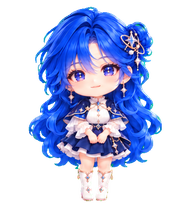
Andromeda
Blue hair and star ornaments, quiet company in a corner of your desktop. Andromeda is the guide of this site and also a Windows desktop pet. She mostly stands quietly and makes a small move now and then; when she is in the way, drag her to the screen edge to tuck her away. There is no chat, AI model, account or telemetry, and everyday use needs no connection.
Desktop pet 0.2.0 · Development build (pre-release). 64-bit Windows 10 or 11.
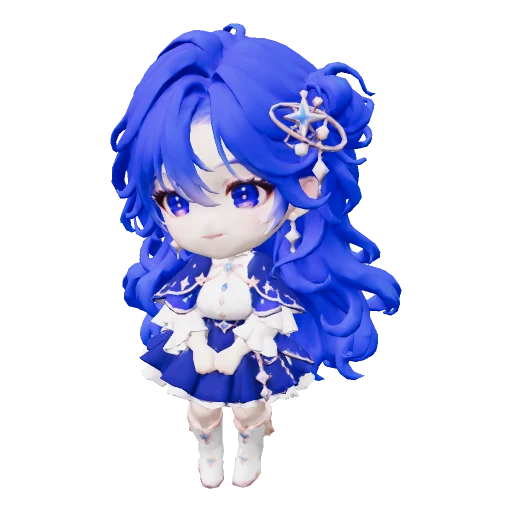
- 7,999 triangles
- 0.7 MB
Andromeda in 3D, made with Modelwright
Moves
The little moves she makes
The web guide and the desktop pet share the same sprite atlas. Move the pointer over a move to watch it again.
Windows desktop pet
Quiet company in a corner of your desktop
Andromeda mostly stands quietly and moves gently every so often. When she is in the way, drag her to the screen edge to tuck her away, leaving only a small star-shaped handle; she peeks out when the pointer hovers, and you just drag her back.
- Drag her wherever you like; double-click her or click ⋯ to open the settings.
- Tuck her at an edge: let go near the left, right, top or bottom edge of the screen and only the small star handle stays. Hover to bring her out; she slides back about 0.7 seconds after the pointer leaves.
- Get her back any time: click the handle, click the tray icon, or choose “Reset position”.
- Set her up the way you like: 75% to 200% scale, always on top, and the wave, hop, wait and check moves.
- Quiet mode, the default, moves gently only once every 45 to 90 seconds; you can also choose “Still” or a livelier pace.
- Don't want her to block clicks? Turn on click-through for the whole window; click the tray icon to turn it off again.
What it does not do
No chat, AI model, voice, account, telemetry or start with Windows. Apart from opening the “Check for new version” page yourself, everyday use needs no connection. Following the pointer across the whole desktop only reads its direction on your computer; no path is recorded or uploaded. Settings are saved on your computer in %APPDATA%\Andromeda\settings.json; delete that file to reset them. The use count at the top of this page is kept by the website (one more each time this page is opened; a single number that does not record who you are) and has nothing to do with the desktop pet program.
Download
Desktop pet 0.2.0
Unzip everything into a new folder, then run Andromeda.exe; Node.js does not need to be installed. If you are using an older version, quit it before opening the new one; your settings carry over.
Unzip everything into a new folder, then run Andromeda.exe. Node.js does not need to be installed
SHA-256 79051c802484f11254ba5ed68805420a32366aa786c62974d5f2ba09e47afa53
Andromeda in 3D
From flat sprite to 3D character
Modelwright turned Andromeda's sprite into a 3D model and sent it into a Unity 6 scene. This is the example from the Modelwright demo video.
- Format
- GLB, usable directly in the browser and in Unity
- Triangles
- 7,999 triangles, reduced locally in Modelwright to a mobile budget
- Texture
- 1024 × 1024 base color texture
- File
- 0.7 MB
- Generated with
- Tripo image-to-3D, from a 192 × 208 pixel sprite
- Status
- A static model, with no skeleton or animation
What's next
The web guide and the desktop pet currently use 2D sprites, with the full set of moves. The 3D version must first be rigged and given moves such as wave, hop and wait before it can take over. Once that is done, the guide and the pet will share one model and one motion state machine. Progress will be posted on the About page.
See how Modelwright did itOn this website
That's her in the bottom-right corner
Click Andromeda to open tips and shortcuts for the current page; drag her to move her anywhere. Dragged to the left or right edge of the screen, she folds into a small star handle: hover to bring her out, click to release her. She looks toward the pointer when it comes close. In the panel you can set how often she moves, or hide her completely; a small button stays in the bottom-right corner to bring her back.
These preferences are saved only in your browser. The Andromeda character and sprite atlas are all rights reserved; please do not repost or reuse them without permission.